
Changing Compensation Type
|
To switch Broker Compensation on locked loans, follow the steps below. |
|
Step |
Action |
|
1 |
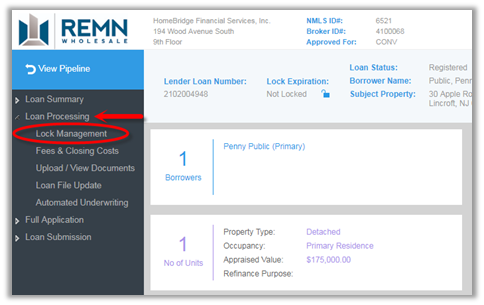
Open the loan, select Loan Processing to open the menu, and select Lock Management.
|
|
2 |
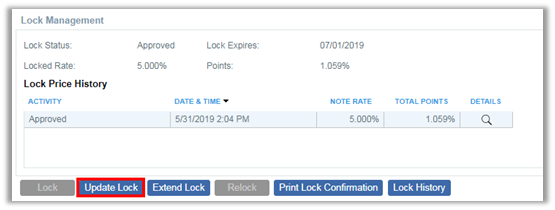
Click Update Lock.
|
|
3 |
· For Lender Paid Compensation select Yes and click Price to Lock. · For Borrower Paid Compensation select No, enter the compensation amount, and click Price to Lock.
|

Broker Compensation – For Unlocked Loans
|
Broker Compensation defaults to Lender Paid. To change to Borrower Paid Compensation follow the steps below. |
|
|
Step |
Action |
|
1 |
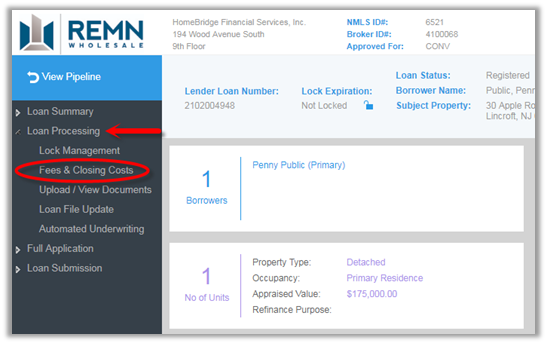
Select Loan Processing to open the menu and select Fees & Closing Costs.
|
|
2 |
Click the Broker Compensation button at the bottom of the screen.
|

|
3 |
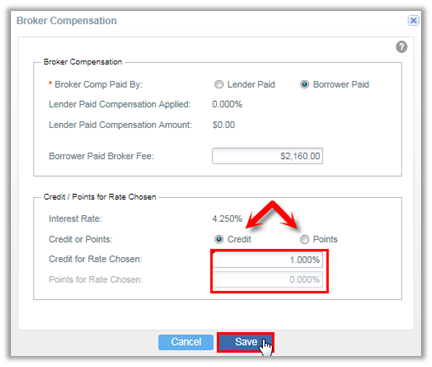
Select Borrower Paid in the Broker Compensation pop-up, enter the Borrower Paid amount, and click Save.
|

|
4 |
To add a Credit for Rate Chosen, Select Credit or Points, enter the percentage of the loan amount for the selection, and click Save.
|
Comments
0 comments
Please sign in to leave a comment.